Step-by-Step Guide to Generating IRN and QR Codes via Invoice Registration Portals
1. Executive Summary & Legal Framework
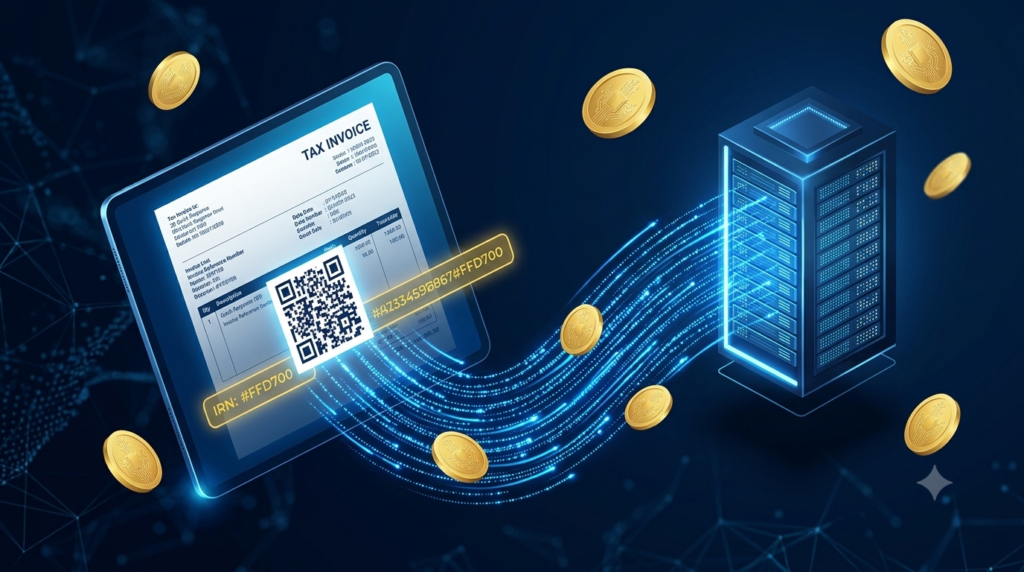
Under the Indian Goods and Services Tax (GST) framework, e-Invoicing has transformed statutory compliance from traditional retrospective reporting into real-time transaction authentication. Managed by the Goods and Services Tax Network (GSTN) and executed through official Invoice Registration Portals (IRPs)—operated by the National Informatics Centre (NIC) and designated private GSPs (GST Suvidha Providers)—e-invoicing mandates that B2B and export invoices receive a unique legal identity prior to issuance.
This unique identity consists of two critical elements:
-
Invoice Reference Number (IRN): A 64-character cryptographic hash generated via the SHA-256 algorithm.
-
Digitally Signed QR Code: A machine-readable, high-density matrix containing core invoice parameters and a digital signature from the IRP, ensuring off-line verification and tampering prevention.
The primary objectives of mandatory IRN and QR Code implementation include:
-
Eliminating Tax Evasion: Eradicating duplicate invoices, ghost billings, and fraudulent Input Tax Credit (ITC) claims.
-
Interoperability: Ensuring invoices generated on one accounting software (e.g., Tally, Zoho, SAP, Oracle) can be read natively by any other system.
-
Automated GST Returns: Seamlessly populating GSTR-1 for suppliers and GSTR-2B for recipients directly from IRP data streams.
2. Applicability & Mandate Thresholds
The applicability of e-invoicing is governed by Notification No. 13/2020–Central Tax (and subsequent amendments), which systematically brought taxpayers under the IRP mandate based on Aggregate Annual Turnover (AATO).
| Implementation Phase | Effective Date | AATO Threshold Limit (INR) | Primary Impacted Businesses |
| Phase I | October 1, 2020 | ₹500 Crore and above | Large Enterprises & Conglomerates |
| Phase II | January 1, 2021 | ₹100 Crore and above | Upper Mid-Market Enterprises |
| Phase III | April 1, 2021 | ₹50 Crore and above | Mid-Market Commercial Entities |
| Phase IV | April 1, 2022 | ₹20 Crore and above | Small to Medium Enterprises (SMEs) |
| Phase V | October 1, 2022 | ₹10 Crore and above | Emerging Businesses |
| Phase VI | August 1, 2023 | ₹5 Crore and above | Micro & Small Businesses |
Statutory Exemptions
Regardless of AATO turnover, specific sectors are explicitly exempted from generating IRN and QR codes under GST Rule 48(4):
-
Insurers, Banking Companies, or Financial Institutions (including NBFCs).
-
Goods Transport Agencies (GTA) supplying services in relation to transportation of goods by road.
-
Suppliers of Passenger Transportation Services.
-
Suppliers of services by way of admission to exhibition of cinematograph films in multiplex screens.
-
Special Economic Zone (SEZ) Units (Note: SEZ Developers are NOT exempt and must generate IRNs).
-
Government Departments and Local Authorities.
3. Anatomical Breakdown: What is an IRN and QR Code?
Understanding the Invoice Reference Number (IRN)
The IRN is a unique, 64-character hash value produced by applying the SHA-256 cryptographic algorithm to three specific transaction values:
Example IRN Output:
3a8f9c12b7d4e5f60a1b2c3d4e5f6a7b8c9d0e1f2a3b4c5d6e7f8a9b0c1d2e3f
Because the hash is calculated from these exact variables, any attempt to issue a second invoice with the same combination results in a duplicate error code (2190: Duplicate IRN) from the IRP system.
Anatomical Structure of the Signed QR Code
The Quick Response (QR) Code embedded on an e-invoice is not a standard web link; it is a high-density, Base64-encoded binary string signed digitally with the IRP’s private key. The QR code contains 10 mandatory data parameters:
Before attempting to generate an IRN, ensure the following prerequisites are complete:
-
Active GSTIN: The supplier and buyer GSTINs must be active on the GST Portal.
-
Enablement on e-Invoice Portal: Check enablement status on
einvoice1.gst.gov.in. If your business crossed the ₹5 Cr threshold recently and remains un-enabled, manually request enablement via the portal by submitting financial proofs. -
IRP Registration Credentials: Create dedicated user credentials on the e-Invoice Portal (separate from primary GST Portal credentials).
-
Mandatory Multi-Factor Authentication (MFA): MFA is required across all IRP and E-Way bill login processes.
-
Compliant ERP/Accounting System: ERP systems (SAP, Tally Prime, Zoho Books, Microsoft Dynamics) must support the official e-Invoice Schema (INV-01) format.
5. Step-by-Step Guide to Generating IRNs and QR Codes
-
Navigate to the official e-Invoice Portal (
einvoice1.gst.gov.inor alternative active IRPs likeeinvoice2.gst.gov.in). -
Click on Registration -> e-Invoice Enablement.
-
Enter your 15-digit GSTIN, complete OTP authentication on the registered mobile number, and submit.
-
Upon successful validation, navigate to Registration -> e-Invoice Portal Login.
-
Enter your GSTIN; the system auto-fetches trade details. Set up a unique Username, Password, and configure Multi-Factor Authentication (MFA) via Authenticator App or SMS OTP.
Prepare the tax invoice inside your ERP software according to official schema rules:
-
Document Header: Set Document Type (
INVfor Tax Invoice,CRNfor Credit Note,DBNfor Debit Note). -
Supplier & Recipient Details: Validate GSTINs, legal names, billing address, location, state codes, and PIN codes.
-
Item Level Specifications: Include item descriptions, unit of measure (UOM), unit price, discount, tax rates (CGST, SGST/UTGST, IGST, Cess), and appropriate HSN codes (4-digit for AATO < ₹5 Cr; 6-digit for AATO ≥ ₹5 Cr).
-
Value Totals: Ensure mathematical precision where Taxable Value + Taxes = Total Invoice Value.
The Invoice Registration Portal accepts input only as a structured JSON payload conforming to Schema INV-01.
-
Automated ERP Integration: API-connected software generates this JSON payload silently in the background.
-
Bulk Offline Tool: For small businesses, download the official e-Invoice Bulk Utility (Excel Tool) from the IRP portal. Input invoice details into the spreadsheet, validate fields using built-in macros, and click Generate JSON File.
Transmit the generated JSON payload to the IRP using one of three primary methods:
-
Method A (Direct GSP/ERP API): ERP communicates directly via RESTful APIs with IRP end-points.
-
Method B (Bulk Offline Upload): Log into the e-Invoice Portal, navigate to e-Invoice -> Bulk Upload, select the
.jsonfile, and submit. -
Method C (Mobile App / SMS): Used primarily for emergency low-volume generation in remote regions.
The IRP processing engine validates the payload in real time:
-
Validates structural JSON syntax against Master Schemas.
-
Verifies GSTIN statuses against the central GST master database.
-
Checks the 64-character hash against the central database to block duplicate invoice numbers.
Output: Upon successful validation, the IRP returns a payload containing:
-
AckNo(Acknowledgement Number) &AckDt(Acknowledgement Timestamp). -
Irn(64-character hash string). -
SignedQRCode(Base64 JWT token string). -
SignedInvoice(Digitally signed copy of the invoice payload).
Your accounting software automatically extracts the returned payload, decodes the SignedQRCode string, renders the two-dimensional matrix graphic, and prints it onto the physical copy or digital PDF of the tax invoice alongside the 64-character IRN and Acknowledgement details.
6. Technical Architecture & Integration Methods
Businesses choose integration protocols based on transaction volume, operational complexity, and infrastructure capabilities.
| Mode of Generation | Recommended Volume | Technical Setup Required | Processing Speed | Error Handling Capability |
| Direct API Integration | > 500 invoices/month | High (API Keys, SSL Certificates, GSP Gateway) | Real-time (< 2 seconds) | Automated synchronous error responses inside ERP |
| Bulk Offline Utility | 50 – 500 invoices/month | Low (Excel with Macros) | Batch (1-2 minutes per batch) | Manual review of error JSON files downloaded from portal |
| GSP Hosted Portals | 100 – 1,000 invoices/month | Medium (SaaS Portal Setup) | Semi-automated batch processing | Web-dashboard UI alerts with guided corrections |
| E-Way Bill Direct Sync | Variable (Logistics heavy) | Medium (Integrated ERP module) | Real-time concurrent generation | Linked validation error flags |
7. Common Errors, Validation Rules & Remediation
When IRP systems reject a JSON payload during validation, specific error codes are returned. The table below lists common error codes, root causes, and resolution steps.
| Error Code | Error Description | Root Cause | Exact Resolution Step |
| 2190 | Duplicate IRN |
An invoice with the same supplier GSTIN, Doc Type, Doc Number, and FY already exists on the IRP. | Verify if IRN was already generated. If changes are needed, issue a Credit Note or cancel the previous IRN (if within 24 hours). |
| 2150 | Invalid Supplier GSTIN |
Supplier GSTIN is inactive, suspended, cancelled, or incorrectly formatted in ERP master data. | Check GSTIN status on gst.gov.in. Update master records or activate GSTIN. |
| 2263 | Invalid HSN Code |
HSN code does not exist in the official GST HSN master list or lacks required digits. | Update HSN to a valid 6-digit or 8-digit code aligned with official NIC master tables. |
| 3028 | Invalid Tax Rate |
Applied tax rates do not match standard GST rate slabs (0%, 0.25%, 3%, 5%, 12%, 18%, 28%). | Correct line-item CGST/SGST/IGST tax rates to match statutory slabs. |
| 2170 | PIN Code does not belong to State |
Recipient PIN code does not match the state code supplied in the address schema. | Cross-check PIN code with the official postal directory and realign state code fields. |
8. Post-Generation Workflows: Cancellation, Amendment & Reconciliation
Cancellation Protocol Rules
If an invoice is cancelled or contains incorrect data after IRN generation, strict statutory timeframes apply:
Amendments & Returns Auto-Population
-
No Direct Modifications on IRP: You cannot edit an IRN once generated. You must cancel it (within 24 hours) or issue a Credit/Debit note.
-
GSTR-1 Integration: The IRP automatically pushes verified IRN details into the supplier’s GSTR-1 (Table 4 for B2B supplies) at midnight daily.
-
GSTR-2B Auto-Reflections: The recipient views auto-populated credit data inside their GSTR-2A/2B for simplified ITC reconciliation.
9. Business Impact & Best Practices for Compliance
Implementing automated e-invoicing offers key strategic benefits:
perational Best Practices
-
Automate API Integration: Avoid manual bulk Excel generation if monthly invoice volume exceeds 100 transactions to eliminate human error.
-
Implement Sandbox Testing: Test all custom ERP schema modifications inside the official IRP Sandbox environment (
sandbox.einvoice1.gst.gov.in) before pushing to production. -
Automate Multi-Factor Authentication (MFA): Set up automated MFA key rotation or GSP API authentication to ensure uninterrupted batch processing.
-
Enforce Real-Time Validation: Use ERP validation scripts to check HSN length, PIN-state matching, and GSTIN status before making the payload call to IRP.