
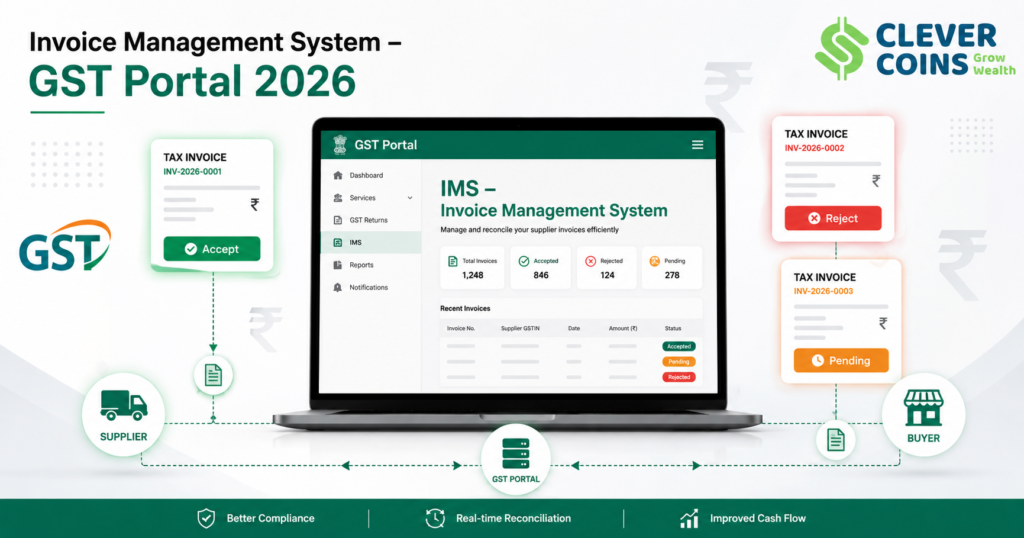
What Is the Invoice Management System (IMS)?
The Invoice Management System (IMS) is one of the most transformative features introduced on the GST (Goods and Services Tax) Portal by the Goods and Services Tax Network (GSTN) in India. Launched in October 2024 and fully operationalised through continuous upgrades in 2025–2026, IMS is a revolutionary tool that brings real-time invoice tracking, matching, and Input Tax Credit (ITC) management into the hands of every registered GST taxpayer in India.
Before the introduction of IMS, taxpayers had limited visibility into the invoices uploaded by their suppliers on the GST portal. The system relied heavily on auto-population of GSTR-2B, which was a static statement. Reconciling purchase registers with GSTR-2A and GSTR-2B was a cumbersome and error-prone manual exercise. Disputes between buyers and suppliers over invoice discrepancies were common, leading to incorrect ITC claims and subsequent GST notices from the department.
IMS changes this equation fundamentally. It acts as a centralised inbox of all inward supply invoices on the GST portal. Recipients (buyers) can now view every invoice uploaded by their supplier in real time, and take specific actions — Accept, Reject, or Mark as Pending — on each invoice. These actions directly impact the GSTR-2B statement and, consequently, the ITC that can be claimed in GSTR-3B.
As of 2026, the GSTN has integrated IMS deeply into the GST compliance ecosystem, making it mandatory to review IMS invoices before filing monthly returns. This blog is a complete deep-dive into every aspect of the Invoice Management System on the GST Portal — from how it works, to the dashboard features, action types, impact on ITC, and best practices for compliance in 2026.
Background: Why Was IMS Introduced?
The GST Council and GSTN identified several chronic pain points in the GST compliance ecosystem that IMS was designed to address:
Problem 1: Mismatch Between GSTR-2A and GSTR-2B
GSTR-2A is a dynamic, real-time statement that reflects invoices uploaded by suppliers. GSTR-2B is a static monthly statement locked at a specific cut-off date. The difference between these two statements caused confusion about which invoices were eligible for ITC in a given return period. Taxpayers often claimed ITC based on GSTR-2A but the ITC was not available in GSTR-2B, leading to demand notices.
Problem 2: Fake and Erroneous Invoices
Fraudulent suppliers were uploading fake invoices or invoices with inflated values on the GST portal. Recipients unknowingly accepted such invoices, claimed ITC, and later faced penalties when the department detected the fraud. IMS provides a mechanism for recipients to proactively reject or dispute suspicious invoices before they auto-populate into GSTR-2B.
Problem 3: ITC Reconciliation Burden
Every GST-registered business spent enormous time and resources reconciling purchase invoices with the GST portal’s data. Accountants and tax professionals had to download GSTR-2A/2B, compare with books, identify mismatches, and chase suppliers for corrections. This was highly inefficient and error-prone for businesses with hundreds of suppliers.
Problem 4: Delayed ITC Claims Due to Supplier Non-Compliance
When suppliers failed to file their GSTR-1 on time, the buyer’s GSTR-2B was not populated, and the buyer could not claim ITC. There was no systematic way to track which supplier had not uploaded the invoice or to communicate the discrepancy. IMS introduces a structured pending action mechanism that bridges this gap.
The GSTN’s Solution: IMS
The Invoice Management System (IMS) was the GSTN’s answer to all these problems. By creating a dynamic, action-based invoice dashboard at the recipient’s end, IMS brings transparency, accountability, and efficiency to the ITC claim process. As of 2026, IMS is considered a cornerstone of GST compliance in India.
How Does the Invoice Management System Work?
The IMS operates through a clear, step-by-step workflow on the GST Portal. Understanding this workflow is essential for every GST-registered taxpayer, tax professional, and business owner in India.
Step 1: Supplier Files GSTR-1 / IFF
The process begins at the supplier’s end. When a GST-registered supplier files their GSTR-1 (monthly or quarterly) or uses the Invoice Filing Facility (IFF) to upload B2B invoices, debit notes, or credit notes, these documents are immediately reflected in the IMS of the respective recipient (buyer). The reflection in IMS happens almost in real time after the supplier saves or files the invoice.
Step 2: Invoice Appears in Recipient’s IMS Dashboard
The recipient can log in to the GST Portal (www.gst.gov.in), navigate to the ‘Services’ section, and access the IMS dashboard. All inward supply invoices uploaded by suppliers appear here in the recipient’s IMS inbox, categorised by their current status. The dashboard displays key invoice details including the supplier’s GSTIN, invoice number, invoice date, taxable value, CGST, SGST/UTGST, IGST, and total invoice value.
Step 3: Recipient Takes Action on Invoices
This is the most critical step of IMS. The recipient must review each invoice and take one of three actions:
- ACCEPT: The recipient confirms that the invoice is correct, the goods/services were received, and they wish to claim ITC on this invoice. Accepted invoices are locked into GSTR-2B.
- REJECT: The recipient disputes the invoice — either because the goods/services were not received, the value is incorrect, the GSTIN is wrong, or for any other valid reason. Rejected invoices are excluded from GSTR-2B. The supplier is notified and must issue a credit note or amend the invoice.
- PENDING: The recipient is unable to take an immediate decision — perhaps awaiting goods delivery, verification, or supplier clarification. Pending invoices are not included in the current month’s GSTR-2B but remain in the IMS for action in a subsequent return period.
Step 4: GSTR-2B Is Auto-Generated Based on IMS Actions
At the end of each return period, GSTR-2B is auto-generated based on the recipient’s IMS actions. Only invoices that have been accepted (or those on which no action was taken and they were accepted by default based on the GSTN’s deemed acceptance rules) flow into GSTR-2B. Rejected and pending invoices are excluded from the current period’s GSTR-2B.
Step 5: ITC Is Claimed in GSTR-3B Based on GSTR-2B
GSTR-3B, the monthly summary return, auto-populates the ITC details from GSTR-2B. The taxpayer can then file GSTR-3B with the correct ITC figures. The linkage between IMS → GSTR-2B → GSTR-3B creates a clean, auditable trail of every ITC claim, making GST compliance more robust than ever before.
Step | Actor | Action / Outcome |
1 | Supplier | Files GSTR-1 / IFF with B2B invoice details |
2 | GST Portal (GSTN) | Invoice auto-appears in Recipient’s IMS Dashboard |
3 | Recipient (Buyer) | Reviews invoice and takes action: Accept / Reject / Pending |
4 | GST Portal (GSTN) | GSTR-2B auto-generated based on IMS actions taken |
5 | Recipient (Buyer) | Claims ITC in GSTR-3B based on auto-populated GSTR-2B |
6 | GST Department | Automated audit trail ensures ITC verification |
IMS Dashboard on GST Portal – Detailed Overview
The IMS dashboard is the central interface where all invoice management activities take place. As of 2026, the GSTN has significantly upgraded the IMS dashboard with new features, filters, and analytics. Here is a detailed breakdown of the IMS Dashboard:
Accessing the IMS Dashboard
To access the IMS Dashboard, follow these steps:
- Log in to the GST Portal: www.gst.gov.in using your GSTIN and password.
- Click on ‘Services’ in the top navigation menu.
- Under ‘Returns’, click on ‘Invoice Management System (IMS)’.
- The IMS Dashboard will load, displaying all invoices pending your action.
Dashboard Sections and Layout
The IMS Dashboard is divided into several key sections:
- Summary Tiles: Shows at-a-glance counts — Total Invoices Received, Invoices Accepted, Invoices Rejected, Invoices Pending, and Invoices Auto-Accepted.
- Invoice Inbox: A detailed table listing all inward supply invoices with full details.
- Filter Panel: Allows filtering by supplier GSTIN, invoice date range, invoice value range, action status, and document type (invoice, credit note, debit note).
- Bulk Action Tool: Enables accepting or rejecting multiple invoices simultaneously.
- Download Section: Allows downloading the IMS data in Excel or JSON format for offline reconciliation.
- Notification Centre: Shows alerts for invoices nearing the action deadline and supplier amendments.
Invoice Details Displayed in IMS
Field | Description |
Supplier GSTIN | 15-digit GST Identification Number of the supplier |
Supplier Name | Legal name of the supplying entity |
Invoice Number | Unique invoice number as filed by the supplier in GSTR-1 |
Invoice Date | Date of the invoice as per supplier records |
Taxable Value (₹) | Taxable value of goods/services (excluding tax) |
IGST (₹) | Integrated GST amount charged (inter-state supplies) |
CGST (₹) | Central GST amount charged (intra-state supplies) |
SGST/UTGST (₹) | State/UT GST amount charged (intra-state supplies) |
Total Invoice Value (₹) | Total amount including all taxes |
Document Type | Tax Invoice / Credit Note / Debit Note |
GSTR-1 Filing Date | Date on which supplier filed GSTR-1 |
Action Taken | Accepted / Rejected / Pending / No Action (auto) |
Action Date | Date on which the recipient took action |
IMS Dashboard – 2026 New Features
In 2026, GSTN has introduced several new enhancements to the IMS Dashboard based on taxpayer feedback and evolving compliance requirements:
- Real-Time Supplier Status Indicator: Shows whether the supplier is GST-compliant, has filed their GSTR-1, and whether their GSTIN is active or suspended.
- ITC Eligibility Flag: An automated flag that indicates whether the ITC on a particular invoice is eligible (based on the nature of supply, recipient’s business category, and Section 17(5) blocked credits).
- Duplicate Invoice Alert: Automated detection of duplicate invoice numbers from the same supplier to prevent double ITC claims.
- AI-Powered Mismatch Detection: Machine learning algorithms flag invoices where the declared value deviates significantly from the industry benchmark or historical averages with that supplier.
- Linked Credit/Debit Note View: Allows the recipient to view all credit notes and debit notes linked to a specific invoice, making it easier to track adjustments.
- WhatsApp and Email Alerts: Integrated notification system that sends alerts to the registered mobile number and email ID when new invoices are received or when action deadlines are approaching.
The Three IMS Actions Explained in Detail
The three IMS actions — Accept, Reject, and Pending — are the cornerstone of the IMS functionality. Each action has specific implications for GSTR-2B, ITC eligibility, and GST compliance. Understanding them in depth is critical.
Action 1: ACCEPT
When a recipient clicks ‘Accept’ on an invoice in IMS, they are confirming the following:
- The invoice details (GSTIN, invoice number, date, value, tax amount) are correct.
- The goods or services mentioned in the invoice have been received.
- The recipient intends to claim ITC on this invoice in the current GSTR-3B filing period.
- The invoice is not related to blocked credits under Section 17(5) of the CGST Act.
Impact: Accepted invoices are included in GSTR-2B for the current return period. The ITC on these invoices flows into GSTR-3B automatically. Once accepted and GSTR-3B is filed, the acceptance is locked and cannot be reversed without filing an amendment.
Important Note (2026): As per the GSTN advisory issued in January 2026, the deadline to accept invoices for a given return period is the 14th of the following month (for monthly filers). After this date, unacted invoices are auto-processed per default rules.
Action 2: REJECT
When a recipient clicks ‘Reject’ on an invoice, they are communicating the following to the GST system:
- The invoice has discrepancies — the goods/services were not received, or the tax amount is incorrect.
- The recipient does not wish to claim ITC on this invoice and disputes its genuineness.
- The supplier needs to either issue a credit note to reverse the invoice or amend it via GSTR-1A.
Impact: Rejected invoices are excluded from GSTR-2B. The supplier is notified of the rejection on their GST portal dashboard. The rejected invoice remains visible in the IMS for a period of 12 months for reference and dispute resolution. ITC on a rejected invoice cannot be claimed unless the supplier issues a corrected invoice.
Key Consideration: Rejecting an invoice does not, by itself, cancel the supplier’s invoice. The supplier must still issue a Credit Note in GSTR-1 to legally reverse the tax liability on their end. Mere rejection by the recipient in IMS does not nullify the tax liability in the supplier’s books.
Action 3: PENDING (Mark as Pending)
The ‘Pending’ action is a unique feature of IMS that allows recipients to defer the decision on an invoice. This is useful in the following scenarios:
- The goods have been ordered but not yet delivered at the time of reviewing IMS.
- There is a dispute with the supplier about the invoice value, and negotiations are ongoing.
- The recipient requires more time to verify the quality or quantity of goods received.
- There is uncertainty about whether the ITC on this invoice is eligible under Section 17(5).
Impact: Pending invoices are excluded from the current period’s GSTR-2B. They remain in the IMS dashboard and can be acted upon in subsequent months. However, ITC on pending invoices cannot be claimed until the invoice is accepted. Note that ITC must be claimed within the time limits specified in Section 16(4) of the CGST Act — currently the earlier of November 30 of the following financial year or the date of filing the annual return (GSTR-9).
What Happens If No Action Is Taken (Deemed Acceptance)?
If a recipient does not take any action on an invoice in IMS by the specified deadline, the GST portal applies ‘deemed acceptance’ rules. As per the 2026 GSTN guidelines, invoices on which no action has been taken by the 14th of the following month are treated as ‘Accepted’ and are included in GSTR-2B. This rule is designed to prevent delays in ITC credit flow but also means taxpayers must actively review IMS regularly to avoid unintended acceptance of incorrect invoices.
IMS Action | Impact on GSTR-2B & ITC |
Accept | Included in GSTR-2B; ITC available in GSTR-3B for current period |
Reject | Excluded from GSTR-2B; ITC not available; Supplier notified |
Pending | Excluded from current GSTR-2B; Deferred to next period |
No Action (Deemed) | Auto-accepted; Included in GSTR-2B as per GSTN deadline rules |
IMS vs GSTR-2A vs GSTR-2B: Understanding the Difference
One of the most common areas of confusion for GST taxpayers is the relationship between IMS, GSTR-2A, and GSTR-2B. Here is a clear comparison:
Feature | IMS | GSTR-2A | GSTR-2B |
Nature | Action-based dashboard | Dynamic, read-only | Static, auto-populated |
Updates | Real-time (live) | Real-time | Locked on specific date |
User Action | Accept/Reject/Pending | View only | View only |
ITC Impact | Direct — controls GSTR-2B | Informational only | Auto-flows to GSTR-3B |
Dispute Resolution | Yes — via Reject action | No | No |
Available Since | Oct 2024 (enhanced 2026) | Jul 2017 | Jan 2021 |
Impact of IMS on Input Tax Credit (ITC) Claims
The most significant impact of IMS is on Input Tax Credit (ITC). ITC is the mechanism under GST that allows a registered taxpayer to claim credit for the tax paid on purchases (inputs) against the tax payable on sales (output). IMS directly controls the ITC flow through the following mechanisms:
ITC Eligibility Conditions Under GST (2026)
For ITC to be validly claimed in India in 2026, the following conditions under Section 16 of the CGST Act must be fulfilled:
- The taxpayer must possess a valid tax invoice or debit note issued by a GST-registered supplier.
- The goods or services must have been received (actual receipt of goods or services).
- The tax charged on the invoice must have been paid to the government by the supplier.
- The taxpayer must have filed their GST returns (GSTR-3B).
- The invoice must not be for goods/services covered under blocked credits (Section 17(5)).
- The ITC must be claimed within the time limits — before November 30 of the next financial year or before filing GSTR-9, whichever is earlier.
IMS directly assists in verifying conditions 1, 2, and 3 by allowing recipients to confirm receipt and supplier filing status before accepting the invoice for ITC.
Section 16(2)(aa) – The IMS Connection
Section 16(2)(aa) of the CGST Act (inserted by Finance Act 2021 and fully enforced from 2022 onwards) states that ITC is available only to the extent that the invoice appears in GSTR-2B of the recipient. Since GSTR-2B is now directly controlled by IMS actions, Section 16(2)(aa) effectively makes IMS the gatekeeper for ITC claims. In 2026, this section is strictly enforced, and any ITC claimed beyond what is in GSTR-2B is subject to reversal with interest at 18% per annum.
Blocked Credits Under Section 17(5) – IMS Filtering
Section 17(5) of the CGST Act lists categories of goods and services on which ITC is not admissible — commonly known as ‘blocked credits’. These include:
- Motor vehicles (for personal use), food and beverages, health services (not for resale or business purposes)
- Works contract services for construction of immovable property (used for personal purposes)
- Goods/services used for personal consumption
- Goods lost, stolen, destroyed, or given as gifts or free samples
In 2026, the IMS Dashboard includes an automated ITC Eligibility Flag that alerts recipients when an invoice may fall under blocked credit categories, allowing them to reject or mark it pending before incorrect ITC is claimed.
Interest on Wrongly Claimed ITC (2026 Rates)
Scenario | Interest Rate (Per Annum) |
ITC claimed in excess of GSTR-2B (Section 50(3)) | 24% |
Wrongly availed and utilised ITC | 24% |
Delayed payment of output tax (not ITC related) | 18% |
ITC reversal due to non-payment to supplier in 180 days | 18% |
IMS for Different Categories of GST Taxpayers
IMS for Monthly Filers (QRMP: Monthly)
Taxpayers who file GSTR-1 and GSTR-3B on a monthly basis (turnover above ₹5 crore or those who opted for monthly filing under QRMP) have a monthly IMS action cycle. They must review and act on IMS invoices received in the current month before the 14th of the following month to ensure correct GSTR-2B generation for that period.
IMS for Quarterly Filers (QRMP Scheme)
Taxpayers under the Quarterly Return Monthly Payment (QRMP) scheme (turnover up to ₹5 crore) file GSTR-1 quarterly but pay tax monthly. For such taxpayers, IMS is also quarterly — invoices accumulate for 3 months and the recipient takes action once per quarter before the quarterly GSTR-2B is generated. The Invoice Filing Facility (IFF) allows suppliers under QRMP to upload B2B invoices monthly, which appear in the recipient’s IMS accordingly.
IMS for Composition Dealers
Composition dealers (small taxpayers with turnover up to ₹1.5 crore who pay a fixed tax rate) are not eligible for ITC and therefore do not have access to the IMS. They file CMP-08 instead of GSTR-3B and their inward supply data is tracked differently. However, their suppliers (who are regular taxpayers) still need to report sales to composition dealers in GSTR-1.
IMS for E-Commerce Operators
E-commerce operators (like Flipkart, Amazon India, etc.) who collect TCS (Tax Collected at Source) under GST operate as large-scale intermediaries. Their supplier invoices are tracked through IMS at scale. The GSTN has built special bulk-action tools within IMS to handle the high volume of invoices that such large platforms deal with monthly.
IMS for SEZ Units and Developers
Special Economic Zone (SEZ) units and developers have unique GST treatment — they receive supplies at zero-rated rates and are eligible for refunds. IMS for SEZ entities tracks these zero-rated supply invoices and helps them manage ITC refund claims efficiently. The portal flags these invoices specifically for SEZ compliance in the 2026 enhanced dashboard.
GSTR-1A: Supplier Amendments Linked to IMS
GSTR-1A is a form that allows suppliers to amend invoices that were rejected by recipients in IMS. This is a critical component of the IMS ecosystem. Before IMS, suppliers could only amend invoices in the GSTR-1 of a subsequent month with limited control. With IMS, the rejection notification from the recipient directly triggers an amendment workflow at the supplier’s end.
How GSTR-1A Works with IMS
- Recipient rejects an invoice in IMS.
- Supplier receives notification on their GST portal dashboard.
- Supplier reviews the rejection reason and files GSTR-1A to amend the invoice.
- Amended invoice appears in the recipient’s IMS again for review.
- Recipient accepts the corrected invoice and it flows into GSTR-2B.
Important Note: GSTR-1A can only be filed after GSTR-1 is filed for that period and before the GSTR-3B is filed. Amendments after GSTR-3B filing must be made in the GSTR-1 of the subsequent month, not through GSTR-1A.
Credit Notes and Debit Notes in IMS
When a supplier issues a Credit Note (to reduce the original invoice value) or a Debit Note (to increase the original invoice value), these also appear in the recipient’s IMS for action. The recipient must accept, reject, or mark as pending these adjustment documents as well. The net ITC available in GSTR-2B is calculated after accounting for all accepted credit and debit notes for the respective period.
IMS-Based Invoice Reconciliation: Best Practices for 2026
Effective use of IMS requires a disciplined, regular reconciliation process. Here are the best practices recommended by GST practitioners and recommended by GSTN for 2026:
Practice 1: Weekly IMS Review Cycle
Do not wait until the last minute to review IMS invoices. Establish a weekly review cycle where your accounts team logs into the GST portal and reviews new invoices in IMS. This prevents the month-end rush and reduces the risk of missing the action deadline.
Practice 2: Match IMS Data with Purchase Register
Every invoice in IMS should be cross-referenced with your internal purchase register (Books of Accounts). Verify the invoice number, date, taxable value, and GST amount. Any discrepancy should be flagged to the supplier immediately rather than waiting until return filing time.
Practice 3: Download and Reconcile in Tally/Excel
Use the IMS download feature to export invoice data in Excel format. Import this into your accounting software (Tally Prime, Busy Accounting, Zoho Books, etc.) and perform a systematic reconciliation against purchase entries. Most modern accounting software in India now has built-in IMS reconciliation modules as of 2026.
Practice 4: Use the Bulk Accept Feature Carefully
IMS provides a bulk accept option to accept multiple invoices simultaneously. While this saves time for businesses with high invoice volumes, it should be used with caution. Ensure that all invoices in the bulk selection have been pre-verified against purchase records. Blind bulk acceptance can lead to incorrect ITC claims and subsequent interest demands.
Practice 5: Monitor Pending Invoices Regularly
Pending invoices do not disappear from IMS — they remain pending indefinitely until acted upon. However, ITC on these invoices cannot be claimed until they are accepted. Create a tracker for pending invoices and ensure they are resolved before the ITC time limit under Section 16(4) — November 30 of the next financial year (i.e., by November 30, 2026 for FY 2025-26 invoices).
Practice 6: Keep Supplier Communication Records
When you reject an invoice in IMS, communicate the reason to the supplier in writing (email or letter). Maintain records of all such communications. This is important for audit purposes and helps resolve supplier disputes faster. In case of GST scrutiny, these communication records demonstrate genuine business transactions.
Practice 7: Automate IMS with GST Return Software
In 2026, several GST return filing platforms (ClearTax, Tally GST, Zoho GST, Masters India, etc.) have integrated directly with the GST portal’s IMS API. Using these platforms, taxpayers can automate the IMS reconciliation, set rules for auto-acceptance of invoices from trusted suppliers, and receive real-time alerts for new invoices and action deadlines.
Key Dates and Deadlines Related to IMS (2026 Calendar)
For GST-registered taxpayers in India, the following key dates govern the IMS workflow and filing obligations in 2026:
Deadline | Applicable To | Activity |
11th of each month | Monthly GSTR-1 filers | Last date to file GSTR-1 and upload invoices in IMS |
13th of each month | Monthly GSTR-1 filers | GSTR-2B generation deadline; IMS actions by this date reflect in GSTR-2B |
14th of each month | Monthly filers (Buyers) | Deadline to take IMS action (Accept/Reject/Pending) |
20th of each month | Monthly GSTR-3B filers | Last date to file GSTR-3B (turnover > ₹5 crore) |
22nd/24th of each month | QRMP filers (state-wise) | Last date to file GSTR-3B for QRMP quarterly filers |
31st Oct 2026 | All regular taxpayers | Last date to file GSTR-9 annual return for FY 2025-26 |
30th Nov 2026 | All regular taxpayers | Last date to claim ITC for FY 2025-26 (Section 16(4)) |
GST Penalties and Consequences of Non-Compliance with IMS
Failure to properly manage IMS can result in significant financial penalties and compliance consequences. Here is a comprehensive overview:
Incorrect ITC Claim Due to Ignoring IMS
If a taxpayer claims ITC on invoices that have not been accepted in IMS or are not reflected in GSTR-2B, the ITC is considered incorrectly availed. The GST department can issue a demand notice under Section 73 (non-fraud cases) or Section 74 (fraud/suppression cases). Penalty up to 100% of the tax demand can be levied in fraud cases.
Interest on Excess ITC Utilisation
Under Section 50(3) of the CGST Act, interest at 24% per annum is charged on ITC wrongly availed and utilised. For FY 2025-26, this means ₹2,000 of interest for every ₹10,000 of wrong ITC kept for just one month.
Penalty for Suppression of Invoices
If a taxpayer consistently rejects genuine invoices in IMS to reduce their ITC (and correspondingly under-declares purchases to reduce tax liability), this can constitute a case of suppression of facts under Section 74. The department can demand the full tax with interest and levy a penalty of 100% of the tax evaded.
Late Filing Penalties (Related to IMS Delays)
Delays in GSTR-3B filing (which can be caused by unresolved IMS actions) attract a late fee of ₹50 per day for regular taxpayers (₹25 CGST + ₹25 SGST) and ₹20 per day for Nil return filers. For annual returns (GSTR-9), the late fee is 0.04% of the aggregate turnover per day (0.02% CGST + 0.02% SGST).
Industry-Specific IMS Use Cases in India (2026)
Manufacturing Sector
Large manufacturing companies in India deal with hundreds of supplier invoices daily — raw materials, capital goods, packing materials, and services. IMS has transformed procurement-to-payment processes for manufacturers. Companies like Tata Motors, Mahindra, and mid-scale MSME manufacturers now integrate IMS data directly into their ERP systems for real-time purchase reconciliation and ITC management.
Retail and E-Commerce
Retail chains and e-commerce companies that source products from multiple vendors across India use IMS to track supplier invoices at scale. The bulk action and filtering features of IMS are particularly valuable for managing high invoice volumes. Platforms like Meesho, Myntra, and D2C brands heavily rely on IMS for their GST compliance.
Real Estate and Construction
Real estate developers receive large invoices from contractors, sub-contractors, and material suppliers. Given the complex ITC eligibility rules for construction (some ITC is blocked under Section 17(5)), IMS’s ITC eligibility flag helps developers accurately identify eligible ITC and avoid blocked credit claims that can attract penalties.
Healthcare and Pharmaceuticals
Pharmaceutical companies and hospitals are subject to specific GST exemptions and reduced rates. IMS helps pharma distributors and hospital chains accurately track ITC on taxable supplies while ensuring that exempt supply invoices are correctly identified and excluded from ITC claims.
IT and Software Services
IT companies, especially those providing Software-as-a-Service (SaaS) or IT-enabled services, deal with both domestic and import of services invoices. IMS helps them manage ITC on domestic supply invoices while Reverse Charge Mechanism (RCM) applies separately for import of services. The 2026 IMS dashboard has improved RCM visibility as well.
Common Errors and Mistakes in IMS Management
Error 1: Not Reviewing IMS Before Filing GSTR-3B
Many taxpayers continue to file GSTR-3B based on their books of accounts without reviewing IMS. This is the most common and costly mistake. Since GSTR-2B (which controls ITC) is now linked to IMS, ignoring IMS can lead to ITC mismatches between what you claim in GSTR-3B and what is available in GSTR-2B, triggering automated notices from the GST department.
Error 2: Accepting Invoices for Goods Not Received
Eager to claim ITC quickly, some taxpayers accept all invoices in IMS without verifying actual receipt of goods. This is a violation of Section 16(2)(b) which requires that goods must be received before ITC can be claimed. If goods are not received (e.g., in transit or not delivered), the invoice should be marked as Pending, not Accepted.
Error 3: Ignoring Pending Invoices Until the ITC Deadline
Taxpayers often forget about pending invoices in IMS until they receive notices or realise their ITC is lower than expected. By then, the ITC time limit may have passed. Always set calendar reminders to review pending invoices well before the November 30 deadline each year.
Error 4: Treating IMS as Replacement for Internal Records
IMS is a GST portal tool — it only captures B2B tax invoices reported by suppliers in GSTR-1. It does not capture unregistered supplier purchases, import of goods/services, or RCM invoices. Taxpayers must maintain their internal books of accounts separately and use IMS as a supplement — not a substitute — for their accounting records.
Error 5: Bulk Rejecting Invoices Without Proper Verification
Some taxpayers use the bulk reject feature carelessly, rejecting invoices without proper verification. This disrupts supplier relationships and creates delays in ITC claims. Always verify before rejecting. If in doubt, use the Pending action to defer the decision.